


When you find yourself comparing Typeform and SurveyMonkey, you’re undoubtedly digging deep into the finer points of online survey tools — and we bet you need some help.
We tested Typeform and SurveyMonkey to figure out the perks of both platforms so you can make the right choice. In addition, we’ll show you a great form-building alternative just in case you’re not impressed with either of these two.
Let’s take a look!
Here’s a quick visual overview of Typeform vs SurveyMonkey just in case you’re in a hurry.
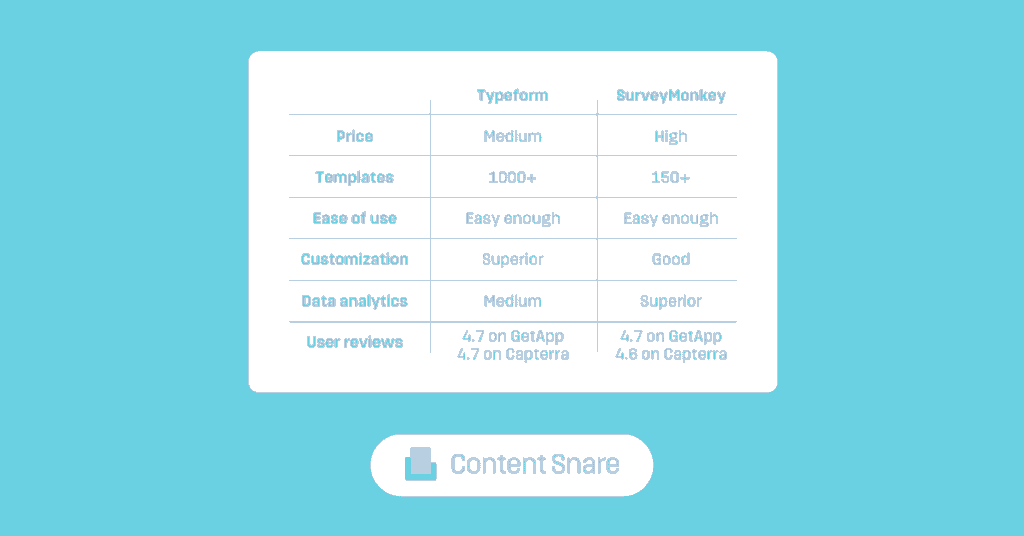
We can analyze online form builders from many angles, but most users care about five elements — intuitiveness, customization, data analytics, integrations, and pricing. We’ll explore each of these in the following sections.
Typeform and SurveyMonkey are pretty equal in terms of intuitiveness. Though both platforms feature lots of functionalities, you’ll quickly find what you need.
Typeform lets you create forms from scratch, use a template, import a list of questions, or create a survey using its AI assistant. Here’s what you see when you design a form from a template:
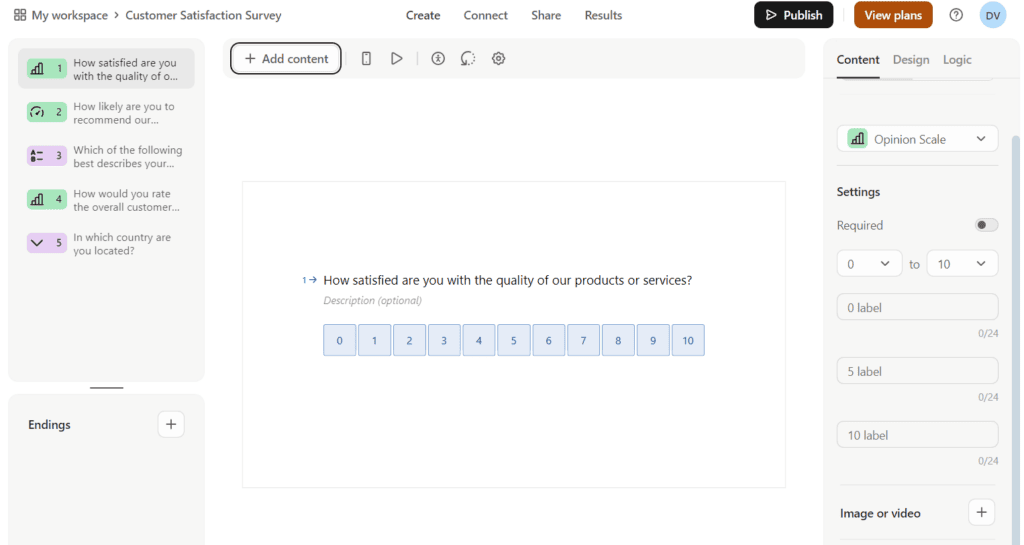
The dashboard is simple as it displays questions one by one. Built-in questions are listed on the left, and you can add new fields by clicking ‘Add content’ at the top. You’ll also find design, logic, and question formatting options on the right-hand side of the dashboard.
SurveyMonkey gives you similar options when starting a new project:
You can start working simply by choosing one of these options. However, we should mention that SurveyMonkey keeps all the settings on the left side of the dashboard:

We believe this makes SurveyMonkey slightly easier to use, but that’s a matter of personal preference.
Users recognize Typeform as one of the most visually appealing form builders, for good reasons. For instance, Typeform helps you create surveys that engage respondents through conversational interfaces:
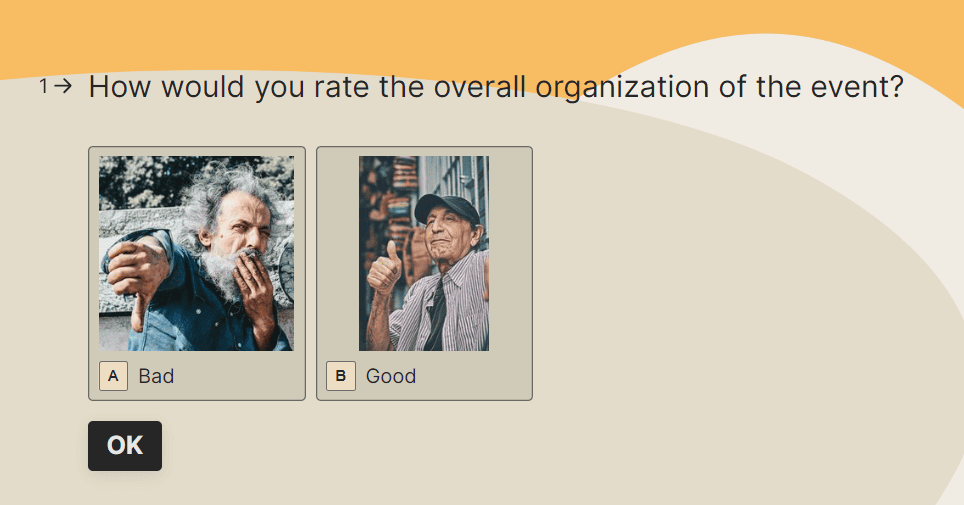
The platform offers extensive design customization, which means you can adjust colors, fonts, layouts, and other visual elements based on the brand identity. The purpose of Typeform’s sleek and modern design isn’t just to capture data but also to provide a pleasant experience for respondents. As a result, your forms could earn higher completion rates and data quality.
Related: Typeform vs Jotform: Which one is better?
SurveyMonkey takes a more traditional approach to customization. While it offers a broad range of templates and design options, its primary focus is on functionality and ease of use. For example, it lets you customize survey themes, logos, and colors, but it doesn't offer the same level of design flexibility as Typeform.
Typeform provides a standard set of reports that allow you to view responses and basic statistics. For instance, you can see performance metrics (starts, submissions, completion rates, etc.) and gain insights for each question individually. We like the ‘Ask AI’ feature — you can type in a form-related question and the AI assistant will show you insightful data.
Even though these reports are sufficient for general purposes, they lack the depth and customization options available in SurveyMonkey. With features like cross-tabulation, filtering, and custom chart creation, it’s easier to dissect and interpret survey-related data. In addition, SurveyMonkey features other data analysis capabilities:
The bottom line is that Typeform's reporting tools are good for users who need quick and accessible insights without complex analysis. But if you need detailed data examination, SurveyMonkey is the superior choice.
Related: Google Forms vs Typeform: Which reigns supreme?
Both Typeform and SurveyMonkey excel in third-party integrations. They integrate with pretty much all of the major CRM, marketing, project management, and automation systems such as Zoom, Airtable, Microsoft Teams, Zapier, Figma, and similar.
The only thing that sets them apart is the search function — Typeform lets you search by app categories, while SurveyMonkey adds a search box and filters for different integration types (built by SurveyMonkey, partner, or Zapier):
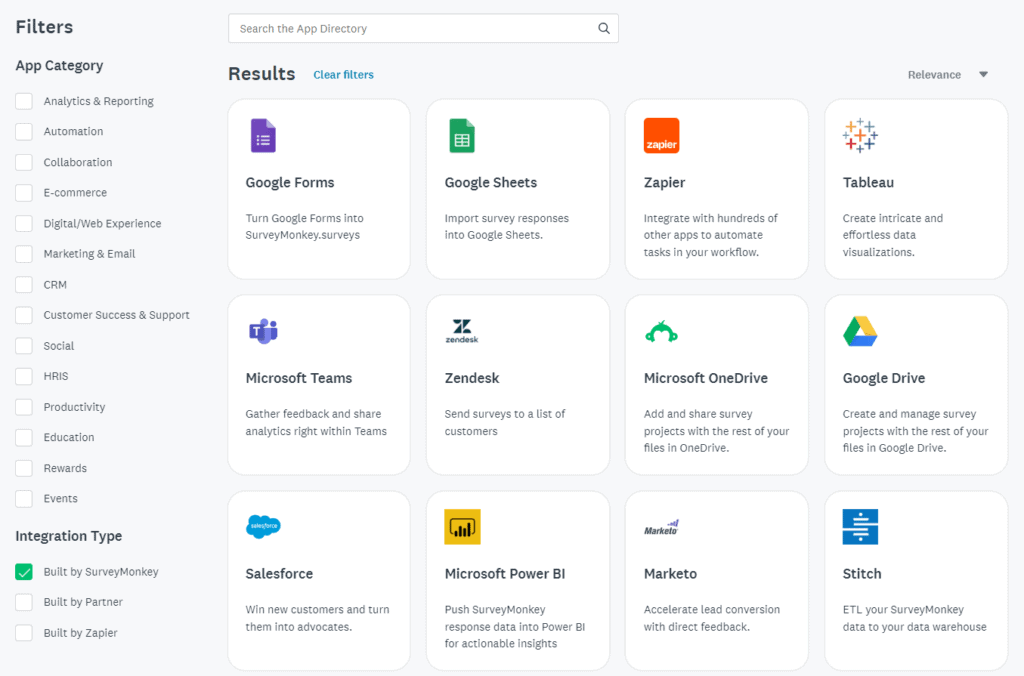
However, this little detail doesn’t change the fact that both platforms successfully integrate with hundreds of third-party systems.
If prices are the decisive factor, you should know that Typeform is more affordable than SurveyMonkey. Typeform’s free plan is for testing purposes only, but you have several paid plans to choose from:
SurveyMonkey has a limited free plan features-wise, and you’ll need much more than that for any kind of serious work. Here are your options:
| Note: Prices may change over time, so make sure to double-check them here: SurveyMonkey pricingTypeform pricing |

SurveyMonkey and Typeform are excellent tools, but they can get laggy when you’re sending out long forms with dozens or hundreds of questions. This is particularly painful for service-oriented businesses collecting loads of information and documents from clients — digital agencies, accountants, law firms, real estate agents, bookkeepers, and so on.
Content Snare proved to be a more efficient alternative for these use cases.
Our platform isn’t designed for bulk data collection, but rather for gathering information from individual clients using in-depth online forms. This is how Content Snare helps digital marketing agencies save 50 hours each month and bookkeeping firms save more than $1000 per client.
How is this possible?
For one, we built a user-centric data collection system that prioritizes efficiency. It lets you guide respondents through the process with detailed instructions (where needed) and in-form conversations to support clients when they get stuck:
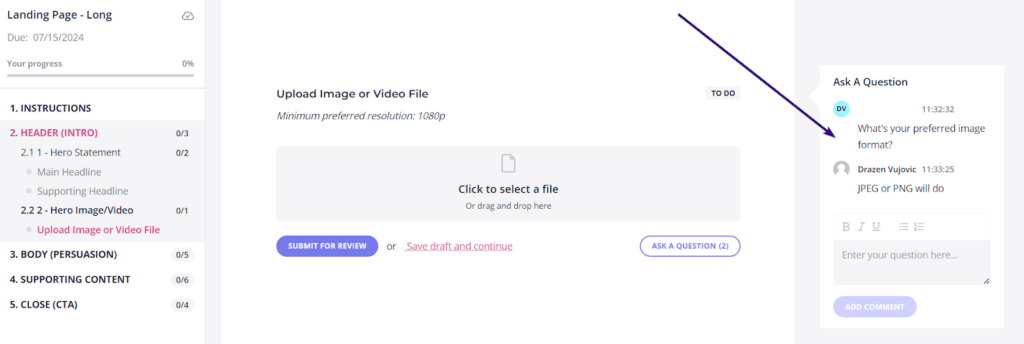
Content Snare also sends automated reminders to your clients, so you don’t have to write and send emails manually — just create a reminder schedule (or choose the default one) and the system will automatically notify respondents to fill out the form.
Related: How this consulting agency turned their content collection worries into wins
It’s also possible to add your company logo and other branding elements to the forms without interfering with the overall user experience. This is done to prevent friction and minimize turnaround time.
Unlike Typeform and SurveyMonkey, Content Snare automatically saves responses. In addition, you’ll like our platform because it:
Many companies prioritize data collection efficiency, and that’s exactly where Content Snare outperforms Typeform and SurveyMonkey. If you want this kind of efficiency in your life and work, sign up for a free 14-day trial right now.

Dražen Vujović is a journalist and content writer. More importantly, he is a father of two and a long-distance runner.


