


So you’ve been tasked with creating a student registration form.
Whether you work for an elementary school, high school, college, or any other educational institution, you might be asking yourself two things: “What do I include?” or “What if I miss important information?”.
We’ve got you covered!
In this post, we’ll be helping you figure out what to ask in a student registration form and we’ll even share a few different tools you can use to create your form easily.
Just want to get your hands on our student registration form template? Skip ahead!

A student registration form is one of the required documents that the school uses during the registration process every academic year or every term to collect important and updated information about students and formalize their registration.
The information collected in the form can help ensure student safety (asking for things like emergency contact information), match them to appropriate programs and student housing options (by uncovering preferences), and help manage student records in general by having all the information collected in one centralized place.
The more comprehensive the registration form, the better equipped your school will be when locating student records and managing other school processes.
The type of questions that you ask during the student registration process will depend on the educational institution you’re building this form for. If you’re working for a college or university, you might want to ask questions about dorm preferences to help match them to a living arrangement that would suit them.
This wouldn’t be relevant if you were creating a form for the parents of elementary school students.
To help you get some ideas, we’ve compiled a list of questions you can ask in your student registration form below.
Save plenty of time building your student registration form with our Content Snare template, which is pre-loaded with tons of questions.
These questions are common questions you see on all types of forms to help identify the student. Some examples:
Asking the student, parent, or guardian for information on the best person to contact in the event of an emergency is critical on this form. Consider including these questions:
These questions help give the school a background of the student when it comes to their health and will help identify any support services the student might need.
If your college or university has limited spots for its programs and student housing, getting the form respondent to select their top choices will help you match them accordingly. Be sure to ask for:
To help match students to living arrangements that suit them well, here are a few specific questions you can ask:

These questions help the school identify whether it needs to confirm information from finance departments.
This part of the form is where the student, parent, or guardian can list any extracurricular activities the student intends to be involved in or has already been involved in in the past.
It’s also worthwhile to ask the form respondent to upload any documents that the school might need to keep on record, including:
To access our free student registration form template, all you have to do is sign up for a free trial of Content Snare and you’ll get access to every single template we offer within your trial period. We trust that you’ll love it so much, you’ll want to stick with us!
Save plenty of time building your student registration form with our Content Snare template, which is pre-loaded with tons of questions.
Now that you have a way better idea of what to ask in a student registration form, how do you go about building a form that makes student registrations easier than ever?
There are several popular form builders you can use to build out your form. Some top names on the market are Typeform, Jotform, Google Forms, Wufoo, and our very own Content Snare.
For guidance on how these tools compare to one another, read 8 of the best form builders and how they stack up.
Some tools are very straightforward to use and some might require some basic coding, CSS, or HTML knowledge. Consider your own skill level as well as the skill level of other people in your school who are involved in student registrations.
Put yourself in the shoes of whoever is going to be completing the student registration form, be that college students, parents, or guardians. The more complicated the tool is to use, the more issues you’ll have collecting the information you need, and the more guidance you’ll need to be prepared to give to people as they make their way through it. Since student registration forms will be completed often and by many people, ask yourself if you have the time to guide them, or if you need th form to be as straightforward as possible.
If you want to brand your form with your school’s name and remove form builder branding on it, you’ll want to check if that’s an option before committing to a tool. Some form builders offer plenty of customization options for adding your logo, school’s colour palette, and more. Other tools don’t offer as many customization options.
Some of the questions that we mentioned above ask the form respondent to upload documents and images like study permits and previous year transcripts. These files are often large, so you want to be sure that the tool you use doesn’t limit upload sizes. Otherwise this can turn into an administrative nightmare for you.

Not to toot our own horn too much, but if we were you, these are a few reasons why we’d consider using Content Snare.
You can customize your form to look exactly as you want it to best represent your school. That means you can add your school’s logo, remove any Content Snare branding, and use your school’s colour palette and fonts.

Content Snare makes your life easy because you can build your forms to include multiple choice questions, open text questions, or questions that require document or image uploads. You can even start with our student registration form template and delete any questions that aren’t relevant to your school. It’s that easy.
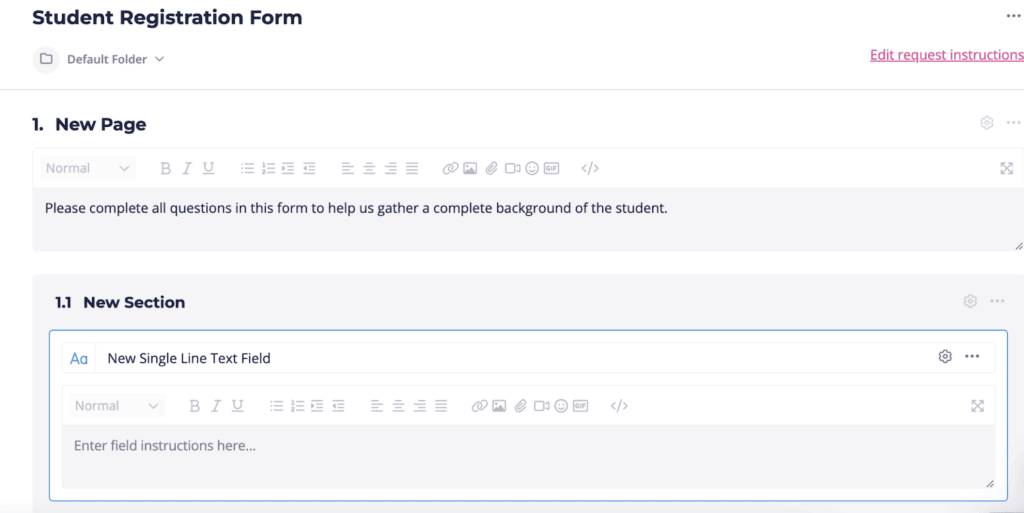
Student registration forms can be quite long and ask the user for a whole lot of information that they sometimes need time to locate. Content Snare offers an auto-save feature built into the forms so that whoever is filling in the form can answer as much as they can and then come back to it later, no stress.
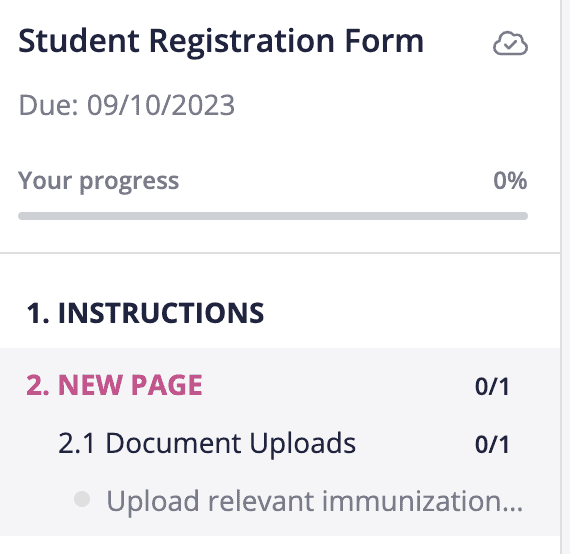
Because we know that files like transcripts or report cards are often large documents, we’ve built Content Snare to allow you to upload large documents so you never have to worry about running into size limitations again.

If you’re panicking about how long it’s going to take you to create a student registration form, remember that it doesn’t have to take you that long and that there’s always a way to speed things up.
We hope this post gave you some good inspiration for questions to ask during student registrations and we encourage you to explore our template to save even more time!

Sylva Sivz is a seasoned copywriter here at Content Snare, based out of Vancouver, Canada. She has spent years working in agency environments and moonlights as a touring house DJ!


