


If you operate in a service business like a marketing agency or accounting firm, you know all too well what it means when client communication doesn’t go well.
It can lead to time wasted trying to find the right documents, re-doing work that was misunderstood, and feeling mega embarrassed when you didn’t reply to a client’s question that got lost in your inbox.
So what’s the solution to building great client communication in a service business?
If you’re still relying on email for client communications, that’s the first place to start. Since the structure of email inboxes can be the cause of plenty of communication hiccups and slowdowns, implementing client communication tools is a valuable best practice.
In this post, we’ll discuss some top client communication tools that can help you collaborate better with clients and increase project success.
A client communication tool is a business tool companies use to collaborate with clients. They allow for the exchange of information in the form of written messages, files, images, documents, and forms. Client communication tools look like email inboxes, messaging apps, data collection tools as well as other formats.
Here are a few reasons why service businesses are switching to using client communication tools instead of email for collaboration:
Should you need to request information from clients like documents and images, a lot of the time the client will run into file size limitations trying to get you that content over email. They end up having to scramble to find another solution like Dropbox at the last minute, and this can cause delays in getting the files over to you on time.
Finding messages, files, and up-to-date file versions can be really messy over email. Even with search functions in some inboxes, it can be difficult to pull up the information you’re looking for quickly.
Since clients receive plenty of emails every day, it can take a while for them to respond, or worse — sometimes they don’t see your email and can end up missing important deadlines.
Content Snare is a secure data collection and client communication platform designed to help service-based businesses, such as accounting firms, legal offices, HR and creative agencies, gather client information with less friction and more structure.
While it includes unmatched form-building capabilities, Content Snare is much more than a form tool. It automates document requests, tracks submission progress, and creates a centralized, branded portal for secure and professional client communication.

According to a recent user survey, teams see a 77% reduction in data gathering costs and a 67% reduction in stalled projects by switching to Content Snare’s automated collection. Here are just a few reasons why Content Snare outperforms email and other communication tools as a client portal:
When you prepare to collect information from clients to start your projects, you often have to spend time on manual tasks like:
You can avoid all the time you spend on these repetitive tasks when using Content Snare as client onboarding software since it offers:

One of the challenges of getting information from clients, particularly when they’re large files like logos or high-quality images, is that they often run into file size limitations with email. As a result, you have to scramble to find another way for them to send you the files at the last minute.

Content Snare eliminates the common file-size limitations of email by allowing clients to securely upload large files - up to 4GB by default, or up to 16GB for enterprise needs. This is particularly helpful when sharing high-res images, tax return backups, or signed contracts.
Security is non-negotiable when collecting sensitive client information. Content Snare is built with enterprise-grade security features that ensure your data (and your clients’) remains protected at every step:
These features make Content Snare one of the most secure client communication tools available, especially for regulated industries like accounting, law, and finance.
If you regularly collect data from your clients and want to explore how Content Snare can help you save time and collaborate effectively, sign up for a free 14-day trial.
Slack is an instant messaging platform teams of any size can use for day-to-day communication, file sharing, and video calls among several other capabilities.
You might already be using Slack to communicate with team members internally, but if you haven’t considered it yet, it’s worth inviting your clients to the platform via Slack Connect for project communications as well.

Using Slack Connect allows you to invite up to 20 external contacts (your clients) to dedicated Slack channels where you can discuss changing priorities, collaborate on campaigns by collecting instant feedback, and share new ideas as they come up.
There are a couple of reasons why using Slack Connect is more beneficial than using email for client communication. First, let’s quote Slack itself. It claims that using Slack results in:
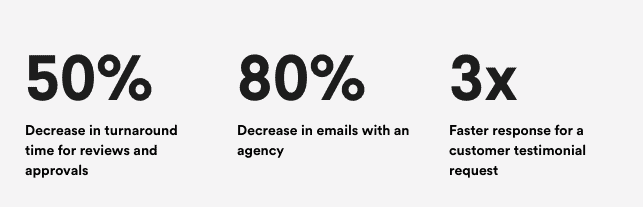
In a nutshell, Slack wins over email for client collaboration for a few reasons:
Once you and your clients get into the swing of using Slack, you can expect to see much quicker response times as communications happen in real-time. You no longer have to wait for a client to check their email; they get notified with your Slack message instantly.

Slack helps you upload and share documents, book virtual meetings, host video calls, share polls, and many other things all within one dashboard either with its native capabilities or through its tailored apps to speed up workflows.

Slack helps you stay organized through specific channels for different topics, group chats, the ability to bookmark messages, search for past messages, star messages, and set reminders. These features help you overcome the challenges of email, like messages being lost in inboxes.

Just a heads up — although Slack offers both free and paid subscriptions, Slack Connect (the feature to invite external collaborators) is only available on paid plans.
ClickUp is a project management software that teams use to assign tasks, view project timelines, track team performance, and collaborate through various in-app features like whiteboards, forms, and chats.
This is another client communication tool that’s typically used by internal teams but that can be expanded to include external guests like your clients. If you’re a workspace owner or admin, you can invite guests to your Workspace on any ClickUp plan. Some plans limit the number of guest seats you can have and the permissions of those guest seats, which can be view only, comment only, edit only, or full access.

Here are a few ways that ClickUp makes for a handy client collaboration tool over email:
Once you have your clients collaborating through the ClickUp dashboard, there’s no need to send emails with project updates or use additional external tools like Stormboard for brainstorming sessions. The tool makes it possible to plan, draft, edit, prospect, confirm, and evaluate tasks all in one place.
Should a client need an update, all they have to do is log in to the platform to get an up-to-date snapshot of where the project is at, rather than having to wait for an email with a status update.
Just like with Content Snare, ClickUp is built to help you save time on routine tasks. One example of what it can do is automatically apply a template like a blog post template to a task when it sees you create a task for a new blog post. ClickUp offers you several automation templates and also lets you set up your own automations and triggers for complete flexibility.
This is really handy when you think of what it can mean for working with clients. For example, you can have ClickUp automatically re-assign the task back to the client when you move a task to “review”. This spares you from having to manually contact the client yourself for a review as they’ll get notified through the platform instantly!
A great thing about ClickUp is that it gives you the flexibility to share some items of your workspace with clients while not having to share everything with them. You have full control of what you want to let your client see and can reserve other details of projects for your internal team.
Click here to explore ClickUp pricing plans.
Slack, Content Snare, and ClickUp are just a handful of client communication tools that can speed up response times, save time, and streamline communication as you work toward project goals.
We hope we’ve given you some inspiration for ways you can improve client communications through the use of modern tools.
Related posts:

Sylva Sivz is a seasoned copywriter here at Content Snare, based out of Vancouver, Canada. She has spent years working in agency environments and moonlights as a touring house DJ!


